From your first lesson in Japanese or Chinese to reviews and account settings, take a look with real app screens.
Nothing found. Try other words, or tell us through Contact.
Getting started
Real app screen (Korean version)
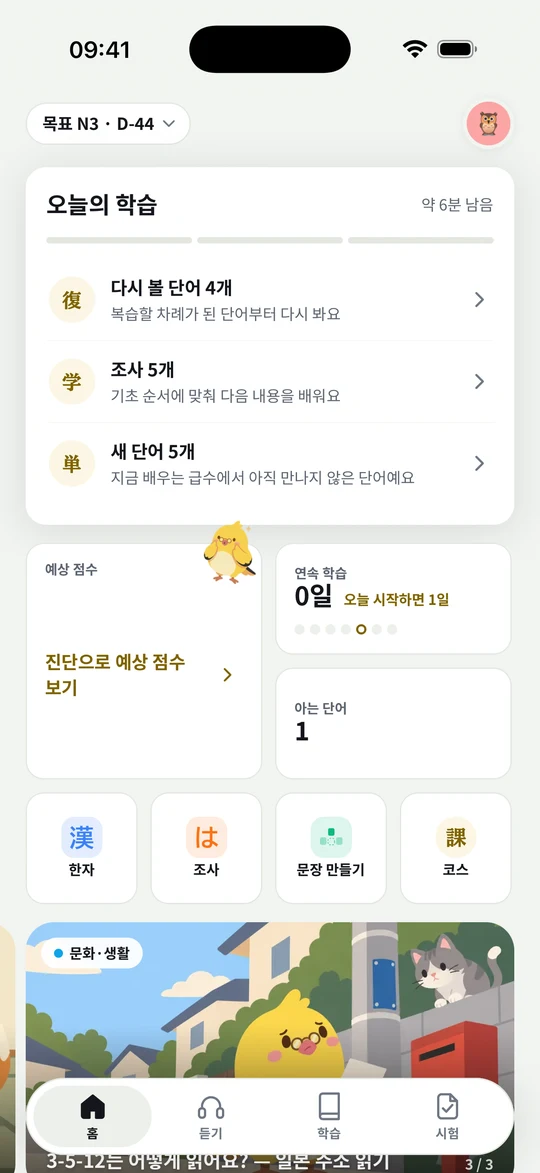
Start with Today’s study
When you first start, choose the language you’re learning and your starting point.
On Home, tap an item in Today’s study.
When you’re done, keep going or pick what you want to study.
What is Nori?
Nori is an app for learning Japanese and Chinese. For Japanese, you save words from songs you love, review them, and check yourself with JLPT questions. For Chinese, you learn pronunciation basics, HSK words, and basic sentences and grammar. Today’s study on Home picks what to do based on the language you’re learning and your goal.
How do I change the language I’m learning?
You choose Japanese or Chinese when you first start. After that, you can switch any time from the menu that opens when you tap your profile at the top right of the screen. Known words and target levels are kept separately for each language, and your streak carries on as one.
Are there Chinese songs?
Not yet. The Chinese course starts with pronunciation basics, HSK words, and grammar lessons. We’ll post on the Notices page when songs arrive.
Is it OK if I’m new to the language?
For Japanese, you can start with hiragana and katakana. For Chinese, you can start with the Pronunciation basics lessons, where you listen to the four tones. On the song screen, you can see furigana and romaji, and an English translation on songs that have one.
Where should I start?
Start with Today’s study on Home. It lines up words to review, new words, the lessons you need now, and practice for weak spots. To choose for yourself, open the Learn tab, and to answer questions, open the Exam tab. The Japanese course also has a Listen tab for finding songs. You can change the tab order in Settings.
Which devices can I use?
You can use it on iPhone and iPad. Tap Start learning in your browser and sign in with the same account to keep studying with your records. We’ll post on the Notices page when the Android version is released.
Where do I change my target level and starting point?
You can change them from the target level at the top of Home, or from the Target card in your profile. For Chinese, you can choose your target level, where to start, and your exam date together. If you’re new to Japanese, start with kana. If you’re new to Chinese, start with Pronunciation basics.
Listening to songs
How do I find a song I want to hear?
In the Listen tab, pick a recommended song or search by title or artist. You can also tap Like or add songs to a playlist to listen to them together. If a song isn’t there, tell us with Request a song in the app or through Contact.
How do I save a word from the lyrics?
Press and hold a word to see its meaning and reading. Tap Save word, and the song you found it in is saved with it. A short tap moves to that lyric line, so press a little longer when you want the meaning.
Can I hide the reading or the translation?
With the あ button at the top right of the song screen, you can turn Furigana, Romaji, and Meaning on or off and change the Text size. The English translation appears only on songs that have one. To hear a line again, tap that line. Press and hold the play button to repeat one line. While a word’s meaning is open, the song pauses, and it continues when you close it.
Do I need an Apple Music subscription?
No. You can listen through YouTube videos without one. If you subscribe to Apple Music, turn on Listen on Apple Music under Songs & lyrics in Settings. Songs keep playing even with the screen off or while you use other apps. YouTube videos play on the song screen.
A song won’t play, or the lyrics are out of sync.
First, check your internet connection. If only a certain song won’t play, or the lyrics are off even through a speaker, tell us the song name and your device through Contact. If the sound is late only with Bluetooth earphones, adjust Earphone delay under Songs & lyrics in Settings.
Learning and reviewing words
Real app screen (Korean version)
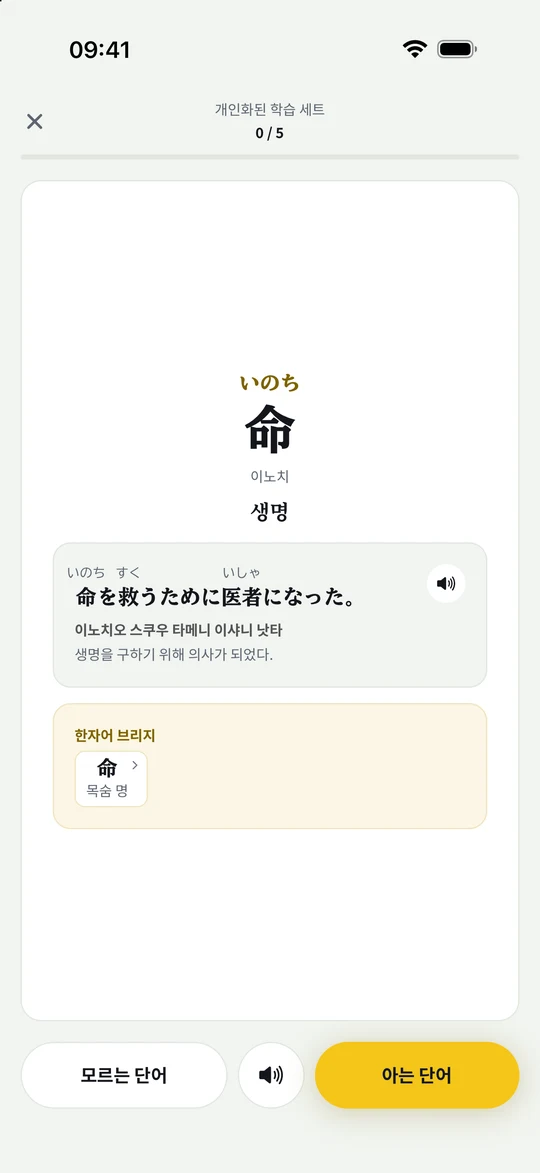
Look, listen, and recall the meaning
Look at the front and think of the meaning first.
Tap the card to check the meaning and an example.
Listen to the sound, then answer whether you remembered it.
When will I see saved words again?
Words you save from songs show up in your words to review from the next day. In the Learn tab, you can also see Words saved from songs grouped by song. Tap Hear it in the song on a review card to go back to the part where the word appears.
How do word cards and review cards work?
Look at the word, think of its meaning, then tap the card to check the meaning and example. Tap the sound button to hear it, too. When learning new words, choose Don’t know or I know it. When reviewing, answer Don’t know or Know it. Reviews are saved card by card, so it’s fine to leave partway through.
Where do I go to learn in order?
Just follow Today’s study on Home. For Japanese, you learn kana, words, kanji, particles, and sentence patterns, starting from your starting point. For Chinese, you learn pronunciation basics, HSK words, and basic sentences and grammar. To study only what you want, open the wordbook or any item in the Learn tab.
Why does a word I marked as known come back?
Words you say you know at first are checked once more later. After that check they become known, and even then we ask now and then to make sure you haven’t forgotten them. Unknown words are words you haven’t learned yet, Learning words are ones you’re memorizing through review, and words to review are the ones due for review today.
How do I practice Chinese pronunciation and pinyin?
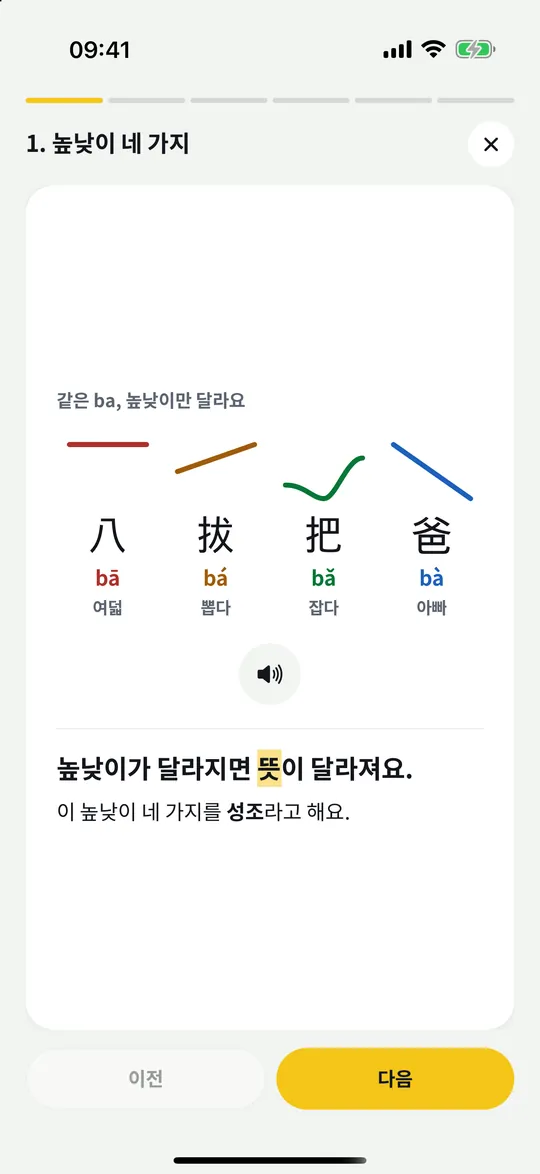
In Pronunciation basics in the Learn tab, see and hear the four tones and pinyin. After a short lesson, check yourself with questions where you tell the sounds apart. Lessons continue in Today’s study based on the level you chose at the start, and you can reopen any lesson from the Learn tab. The tone marks above the pinyin show the pitch, and you can turn off Tone colors in Settings.
The four tones you see and hear in Pronunciation basics (Korean version)
How do I learn Chinese sentences?
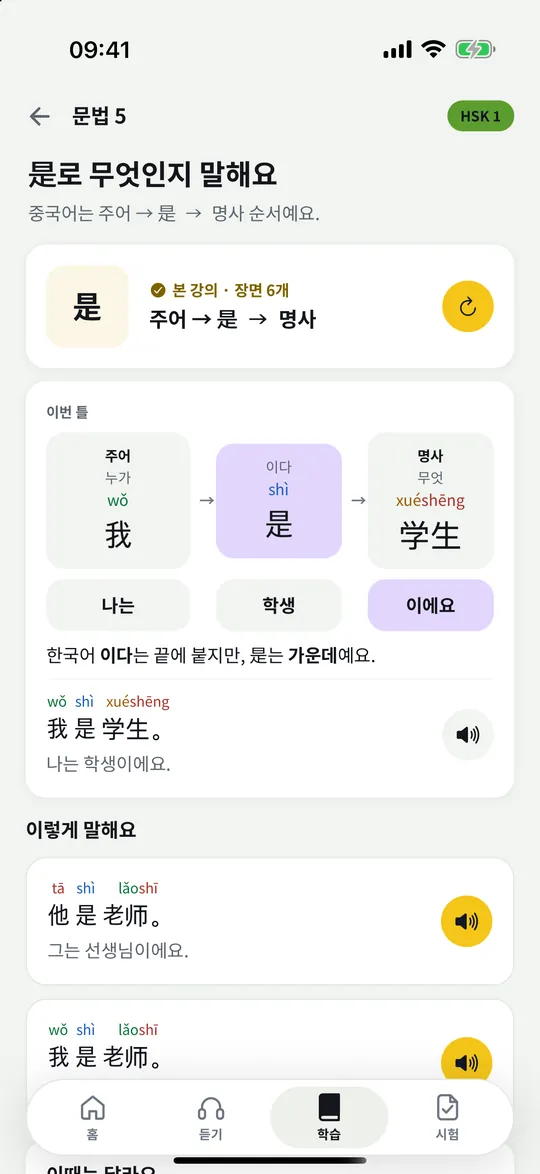
In Basic sentences, you learn word order. In Grammar, you practice with short lessons and examples. Word cards also show example sentences with pinyin and meanings, and you can hear them with the sound button. Sentence builder and Pinyin typing are in the Learn tab.
A grammar lesson where you see word order and check it with examples (Korean version)
What can I practice with songs?
You can build sentences from lyrics or type Japanese yourself. In Speaking, you read sentences aloud and check your pronunciation. Choose a practice from a song’s menu, or start from the Learn tab.
Speaking practice isn’t working.
Check that you’re signed in and have allowed microphone access. You can change Nori’s microphone permission in your device’s Settings app. If you’ve used up the free limit, try again on the next study day or use Nori Plus.
Are the word levels official?
The JLPT doesn’t publish an official vocabulary list. Nori set the levels in an order that’s good for learning in the app, using study materials as a reference. The app’s levels don’t exactly match the words that appear on the real test.
Playing games
What games are there?
Choose one in the Game Center at the bottom of the Learn tab. For Japanese, you can play Nori’s Ticket Booth, where you listen to customers and print tickets, Ninja Nori, where you type readings, Nori’s Sushi Bar, where you pick the right counter word, Shiritori with Nori, and more. For Chinese, games that fit the language you’re learning appear, such as Tone Pairs and Word Match.
What happens to words I miss in games?
Words you miss in games collect in Mixed-up words in the Game Center. If you’ve already studied a word, its next review moves up to tomorrow, so it shows up in your words to review. Words you haven’t learned yet can be added to your words to review from Mixed-up words.
How many rounds can I play?
You can play five rounds a day for free. Finish Today’s study to get three more, and if you like, watch an ad to add three more (up to three times a day). With Nori Plus for the language you’re learning, there’s no limit. The daily limit resets at 4 a.m. Korea time (KST).
Preparing for exams
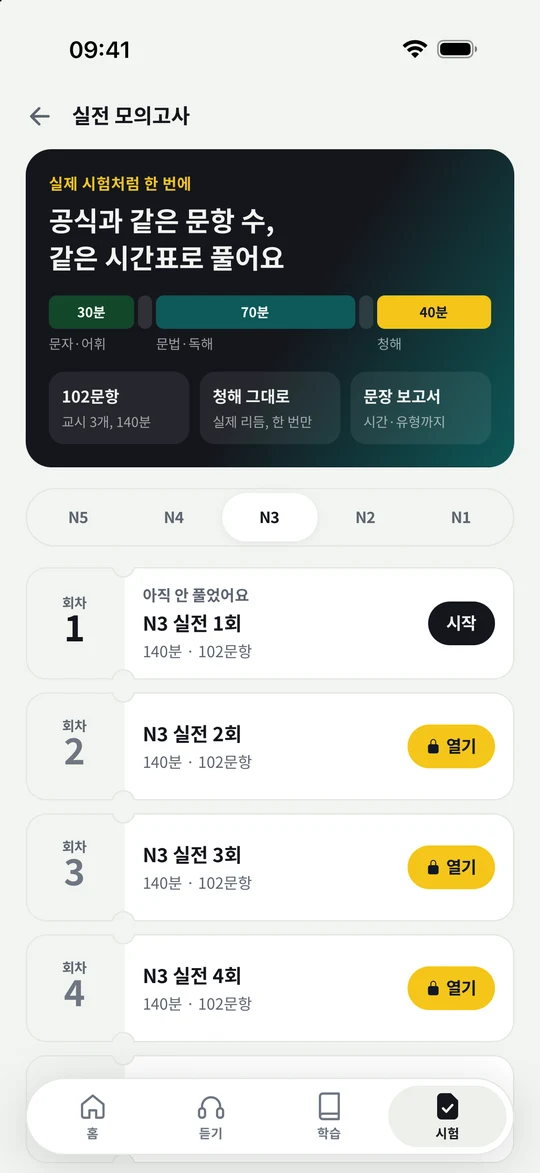
Real app screen (Korean version)
Take your level check and practice to a full exam
For Japanese, take a Level check to see your estimated score and weak spots.
Work on what you’re missing in Practice by type.
In Full mock exams, choose a level and a set to take.
Which levels can I prepare for?
You can prepare for N5 through N1. Take a Level check to see where you are now, and use Practice by type to work on what you’re missing. In a Full mock exam, you answer in the test’s format against the clock. New to the test? See the exam guide for the levels and pass marks first.
Are the mock exams official past papers?
No. The questions are made by Nori. Nori is not affiliated with the JLPT organizers, and these are not official past papers. They’re built to match the format and timing of the real test so you can practice.
Is the estimated score the same as my real score?
The estimated score and pass chance are estimates calculated from the questions you’ve answered so far and their difficulty. After the Level check, your practice and mock exam results are reflected too. They don’t guarantee real test results. Use them to see which sections to study more.
Are full mock exams free?
You can take one full mock exam for each JLPT level for free, and the rest are available with Nori Plus. The Level check and Practice by type are free. Check what’s available in the Exam tab in the app.
Account and settings
How much can I use for free?
Listening to songs, lyrics, saving words, reviews, Today’s study, and courses are free and have no ads. Games and some practice have a daily limit. For games, you get more rounds when you finish Today’s study, or when you choose to watch an ad. You can subscribe to Nori Plus for Japanese or Chinese alone, or for both together. For the languages you subscribe to, you practice without limits and get Study insights and voice packs, and for Japanese you also get JLPT full mock exams. Check the price and whether you can get a trial in the app and the store before you pay.
Can I use it without signing in?
You can start the app without signing in. But your records stay only on that device, so sign in before you delete the app or change devices. Sign in with the same account to keep using your records. Speaking and studying in a browser require signing in.
Where do I change display and learning settings?
In Settings & privacy from the profile menu, you can change Appearance, Language, Study reminder, and Tab order. Learning settings include Kana cards and Skim known words for Japanese, and Tone colors for Chinese. To change the Home layout, use Customize Home in the learning settings. If reminders don’t arrive, also check Nori’s notification permission in your device’s Settings app.
When do the study day and daily limits reset?
A new study day starts at 4 a.m. Korea time (KST). Words to review, Today’s study, and daily limits all follow this time. Japanese and Chinese limits are counted separately.
How do I add a widget?
Touch and hold an empty area of your iPhone Home Screen, then find Nori in Add Widget. Choose the size you want and add it. It may take a moment for what you study in the app to show up on the widget.
Does deleting my account end my subscription?
Deleting your account and managing your subscription are separate. If you’re subscribed, first check auto-renewal in your store’s subscription settings. Deleting your account also deletes your study records on the server, and this can’t be undone. For details, see the Privacy Policy and Terms of Service.
A meaning or translation looks wrong.
In Settings, open Send feedback under Help & about and choose Wrong translation. Tell us which song or word felt off and how, and we’ll check it. If you can’t open the app, use the web contact form.
 Nori
Nori